
System Design Interview Preparation That Builds Real Skill
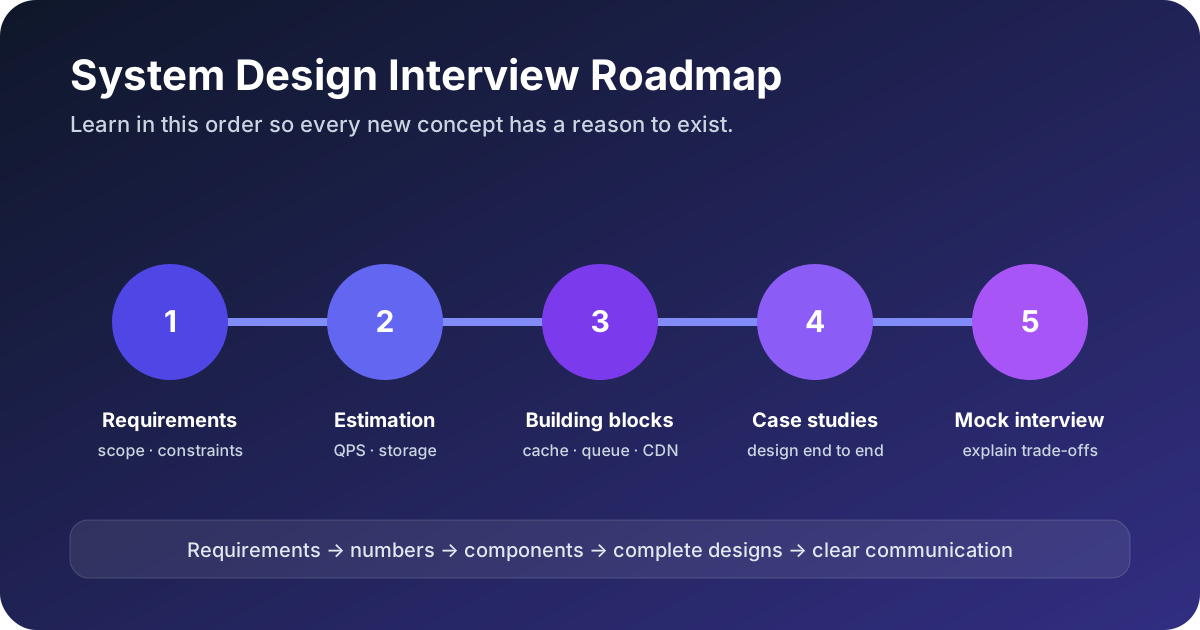
System design interview preparation becomes confusing when you collect disconnected diagrams without learning why each component exists. You can memorize a URL shortener, a news feed, and a chat system, yet freeze as soon as the interviewer changes one requirement. A better plan builds reusable reasoning in a deliberate order: requirements, scale, core building blocks, data decisions, complete case studies, and communication practice.
This guide gives you that path. It explains what to learn, what to ignore at first, how to practice each stage, and how to know when you are ready for a mock interview. Use the roadmap as a syllabus rather than a list of technologies to memorize.
Step 1: Learn to Clarify the Problem Before Drawing
Most interview prompts are deliberately underspecified. “Design a news feed” does not tell you whether the feed is chronological or ranked, whether users can follow millions of accounts, or whether a new post must appear instantly. The interviewer expects you to narrow the problem.
Start with functional requirements, the actions the system must support. Choose three core actions. For a feed, those could be publishing a post, following a user, and reading a feed. Put reactions, ads, moderation, and search outside the first version unless the interviewer makes them central.
Then ask about non-functional requirements:
- How many daily active users and peak concurrent users?
- What is the read-to-write ratio?
- What latency matters for the primary action?
- How much downtime is acceptable?
- Can clients read stale data, and for how long?
- Is the product global, and must data remain in a region?
Finish with a scope statement: “I will design the read-heavy feed path for 100 million daily users, targeting a sub-200 ms response and accepting short-lived eventual consistency for new posts.” That sentence prevents the discussion from drifting and gives every later decision a reason.
Step 2: Turn Users Into Numbers That Change the Design
Capacity estimation is not an arithmetic contest. Its job is to reveal whether one machine is enough, whether storage needs partitioning, whether media needs a CDN, and whether bursts need a queue.
- Estimate daily read and write actions.
- Divide by roughly 100,000 seconds per day for average QPS.
- Apply a peak factor that matches the product, often three to ten.
- Estimate record size, retention, and replication overhead.
- Estimate bandwidth for large responses, images, or video.
- State what each result changes in the architecture.
For example, 500 million feed loads per day is about 5,000 average reads per second. A five-times peak gives 25,000 peak reads per second. The useful conclusion is: one database cannot serve this read path reliably, so the design needs horizontally scalable services, caching, and a read-optimized store.
The full back-of-the-envelope estimation guide includes storage, bandwidth, cache sizing, and a worked URL shortener example. Practice the calculations aloud so assumptions remain visible and easy to correct.
Step 3: Master the Core System Design Building Blocks
Do not learn tools as brand names. Learn the problem each category solves, the trade-off it introduces, and the signal that tells you to use it.
Load balancing and stateless services
A load balancer distributes requests across healthy service instances. Stateless application servers are easy to replace and scale because any instance can handle the next request. You should understand health checks, failure detection, session handling, and why the load balancer itself needs redundancy.
Caching
A cache reduces latency and protects slower storage by keeping frequently requested data in memory. Learn cache-aside, write-through, write-back, TTLs, eviction, invalidation, cache stampedes, and hot keys. The important question is never merely “should I use Redis?” It is “what data is safe to cache, how stale may it be, and what happens on a miss?” Start with the guide to caching strategies in System Design.
Queues and asynchronous work
A durable queue absorbs bursts and lets producers continue without waiting for slow work. It introduces delivery semantics, retries, duplicate processing, ordering limits, dead-letter handling, and consumer lag. Use it when the user does not need the final result synchronously or when downstream capacity must be protected.
CDNs and object storage
Large blobs do not belong in the primary transactional database. Store images, video, and documents in object storage and serve them through a CDN. Discuss upload URLs, metadata, cache keys, invalidation, regional replication, and origin protection.
Replication and sharding
Replication creates copies for availability and read scale. Sharding divides data so storage and write load can grow beyond one machine. Replication introduces lag and failover complexity; sharding introduces partition keys, rebalancing, cross-shard queries, and hot partitions. The database replication, sharding, and consistency guide connects these choices.
Step 4: Choose Data Stores From Access Patterns
Database decisions should begin with queries, not with a favorite technology. Write the main access patterns before choosing SQL, document, key-value, wide-column, graph, or search storage.
Ask:
- Which fields identify a record, and which fields must be searchable?
- Are transactions required across several records?
- Is the workload read-heavy, write-heavy, or both?
- Does one tenant or celebrity create a hot partition?
- Can the system tolerate stale reads?
- Will the query need joins, range scans, aggregation, or full-text search?
A relational database is often the simplest correct starting point when the schema and relationships matter, transactions protect invariants, and scale is moderate. A key-value or wide-column store can fit predictable high-scale access by partition key. A search engine fits relevance ranking and text queries, but it is usually a derived index rather than the source of truth.
Explain indexes too. An index speeds reads by maintaining an ordered or hashed structure, but every extra index consumes storage and makes writes more expensive. A design that promises fast reads on every field without paying the write cost is incomplete.
Step 5: Learn Consistency, Availability, and Failure Modes
Distributed systems fail partially. One service can be healthy while a database replica is unreachable; a request can time out after the write succeeded; a message can be delivered twice. Strong candidates design these cases intentionally.
Learn the difference between strong and eventual consistency, then connect the choice to user experience. A bank balance and a “like” counter do not need identical guarantees. During a network partition, the CAP theorem forces a choice between returning a consistent result and remaining available. Outside partitions, latency and consistency still trade off, which is why PACELC is a useful extension.
For every important write, ask:
- Can the client safely retry?
- Is the operation idempotent?
- What is the source of truth?
- How are replicas promoted after failure?
- Can an old primary accept writes after failover?
- How does the system detect and repair divergence?
Include timeouts, exponential backoff with jitter, circuit breakers, dead-letter queues, and reconciliation jobs only when they solve a named failure. Listing patterns without the failure makes the answer sound memorized.
Step 6: Practice Complete Case Studies
Once the building blocks make sense, practice applying them to different workload shapes. A useful set includes one read-heavy lookup system, one write-heavy or bursty system, one feed, one real-time system, and one media-heavy platform.
The System Design case-study library provides five complete designs:
- A URL shortener for key generation, caching, and read-heavy scale.
- A social bookmarking service for tags, cache partitioning, and data growth.
- A coding contest platform for sandbox workers, queues, and burst traffic.
- Facebook News Feed for fanout, hot users, and ranked read paths.
- Google Typeahead for prefix search, precomputation, and tight latency budgets.
Do not read a solution and count it as practice. Hide the article, set a 45-minute timer, and produce your own requirements, estimates, APIs, data model, and architecture. Compare afterward. Record the missing decision, not merely the missing component.
Want to master this with video lessons and real case studies? This topic is covered in depth in my Udemy course System Design Fundamentals for Interviews — 5.5 hours, rated 4.8★, built from real interview questions.
Step 7: Practice Communication, Not Just Architecture
A good design that nobody can follow is a weak interview answer. Narrate decisions in a predictable order. Confirm the direction before going deep, keep boxes labeled by responsibility, and walk a request through the diagram.
Use the step-by-step System Design interview framework to time-box a 45-minute round:
- 5 minutes: requirements and scope.
- 5 minutes: scale estimates.
- 5 minutes: APIs, entities, and access patterns.
- 15 minutes: high-level read and write paths.
- 15 minutes: bottlenecks, reliability, and trade-offs.
State decisions as trade-offs: “I will cache the first page of active feeds because reads dominate and short staleness is acceptable; this reduces database load but requires invalidation and hot-key protection.” This is stronger than naming a tool because the interviewer can see the reasoning.
A Four-Week System Design Study Plan
Week 1: requirements, estimation, and fundamentals
Practice scoping five prompts. Learn latency, throughput, availability, horizontal scaling, load balancing, and basic estimation. End the week by explaining why each number changes a component.
Week 2: data, caching, and reliability
Study SQL versus NoSQL, indexes, caching, replication, sharding, consistency, and CAP. Redesign the same read-heavy service three ways and compare the trade-offs.
Week 3: complete case studies
Complete URL shortener, news feed, typeahead, and one queue-heavy design. Use a timer. Review whether you covered both read and write paths, failures, and hot spots.
Week 4: mock interviews and correction
Run at least three spoken mocks. After each one, write a short correction log: missed requirement, unjustified estimate, unclear diagram, weak trade-off, or failure not handled. Repractice the weakest stage instead of reading another full solution.
Download the System Design interview checklist and keep it beside you during practice. Use the System Design glossary when a term is unfamiliar, then return to the architecture decision.
How Do You Know You Are Interview-Ready?
You are ready when you can handle an unfamiliar prompt without relying on a memorized diagram. A practical readiness test is whether you can:
- Clarify scope in under five minutes.
- Estimate the dominant load without silent arithmetic.
- Choose storage from access patterns and consistency needs.
- Walk complete read and write paths.
- Identify the first bottleneck and at least two failure modes.
- Explain one major trade-off in plain language.
- Respond to a changed requirement without rebuilding everything.
If one stage consistently breaks, practice that stage across several prompts. More diagrams will not fix weak estimation, and more technology names will not fix unclear requirements.
Key Takeaways
- Learn requirements and estimation before collecting components.
- Study building blocks by the problem they solve and the trade-off they introduce.
- Choose data stores from access patterns, consistency, and growth.
- Practice complete cases under a timer and keep a correction log.
- Speak decisions aloud; communication is part of the design.
Next Steps
Download the checklist, choose one case study, and complete a 45-minute practice round without reading the solution first. Then compare your answer with the case-study library and revise the single weakest decision.